Saving & Loading
Saving
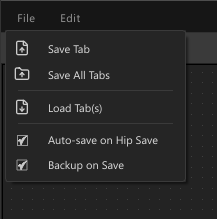
Open the File menu in the top bar.
| Action | Description |
|---|---|
| Save Tab | Save the current tab to a .json file |
| Save All Tabs | Save each tab individually — prompts for a path per tab |
| Auto-save on Hip Save | Toggle — when enabled, all tabs with a saved path are written automatically every time the Houdini .hip file is saved |
The picker saves to a .json file. Everything is stored in that file:
- Button labels, colors, shapes, modes, control assignments
- Scripts
- Pose data (including the full pose geometry for cross-session restore)
- Background images (embedded as base64)
- Zone layout
Path Conflicts
When Auto-save on Hip Save is enabled, if two or more tabs point to the same file the conflicting tabs are skipped and a warning is shown. Tabs with unique paths still save normally.
Loading
File → Load Tab(s) — opens a file picker. Multiple files can be selected at once; each becomes its own tab.
File Location
The picker file can live anywhere. A good convention:
$HIP and other Houdini variables are supported in paths.
Poses Across Sessions
Pose data is fully self-contained in the JSON. Pose buttons work as soon as you reopen the file — no recapture needed.
Multiple Characters
Each character or shot can have its own .json file. Load multiple files to get multiple tabs.
Backups
Edit → Backup on Save toggles automatic backups. Enabled by default.
When enabled, every save rotates up to 3 backup copies into a picker_backups/ subfolder next to your .json file:
$HIP/picker/picker_backups/
    my_character_bak1.json   ← most recent
    my_character_bak2.json
    my_character_bak3.json   ← oldest (deleted when a 4th would be created)
To restore, copy the desired _bakN.json file over your main .json and reload the tab.
← Canvas & Background · Zones →